Skip to product information
1 of 18
Special Order

Garmin

Garmin PowerSwitch™

Garmin PowerSwitch™

SKU:BT010-02466-00

Regular price $575.00 AUD
Regular price Sale price $575.00 AUD

Not sure it fits?

Fits your selected vehicle

Payment methods
  • American Express
  • Apple Pay
  • Google Pay
  • Mastercard
  • PayPal
  • Shop Pay
  • Union Pay
  • Visa
View full details
Garmin PowerSwitch™
Garmin PowerSwitch™
Regular price $575.00 AUD
Regular price Sale price $575.00 AUD

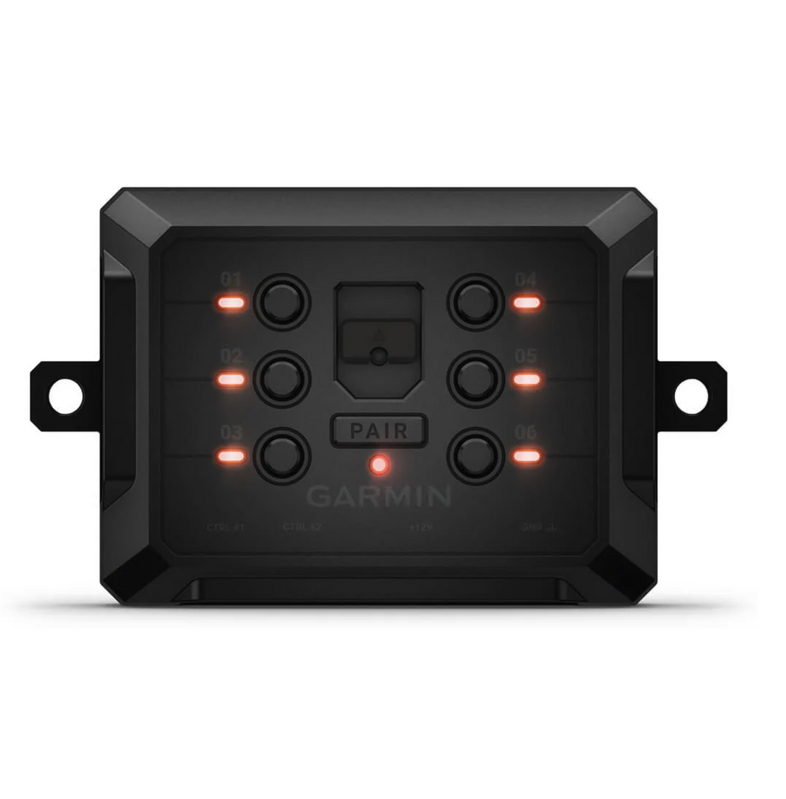
A rugged, weatherproof digital switch box that lets you run up to six 12-volt accessories from your phone, compatible Garmin navigator or in-dash display, with no dash drilling or switch panels required.

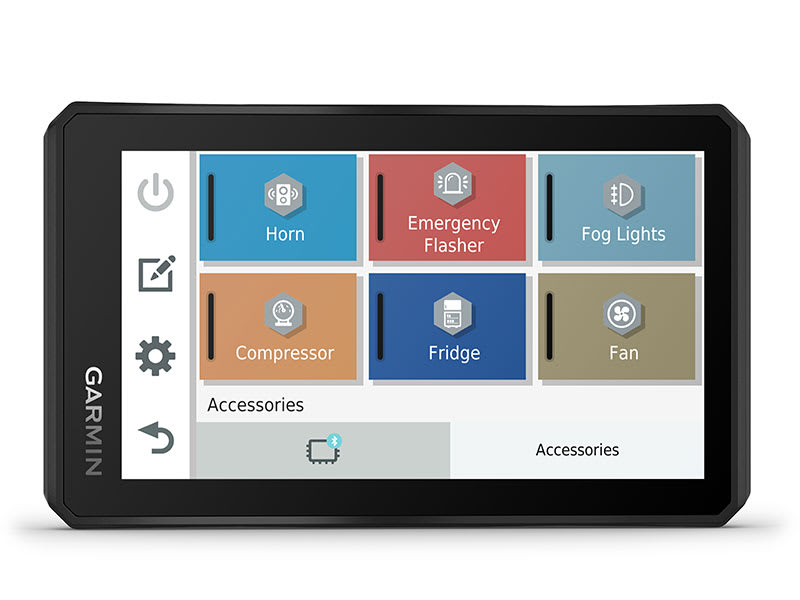
Garmin PowerSwitch replaces a dash full of toggle switches with one compact, sealed control box. Mount it under the bonnet or on the chassis, wire in your lights and accessories, then switch everything wirelessly from the Garmin PowerSwitch app on your smartphone or a compatible Garmin sat nav.

Six circuits, serious capacity

Each of the six outputs handles up to 30A, with a combined system limit of 100A. That covers light bars, spotlights, rock lights, fridges, UHF radios, air compressors, horns, central locking and most other 12-volt gear. Not suitable for reversing polarity motors such as winches.

Clean, simple install

There is no need to cut switch holes in the dash or feed extra wiring through the firewall. The unit connects directly to the battery and sits clear of the vehicle's own electronics.

Built for the tracks

At just 12.5 x 7.5 x 3cm and IPX7 rated, PowerSwitch is small and tough enough for 4WDs, utes, side-by-sides, UTVs, ATVs and snowmobiles.

Your switches, your layout

Build custom on-screen switch panels with your own labels, icons and channel groups. Lighting outputs can also be set to dim or flash.

Automatic triggers

Two hardwired control inputs accept a 3.3 to 18V signal. Wire one to the ignition and selected accessories switch on automatically every time you start the vehicle.

Scales with your build

Pair up to four PowerSwitch units to one controller, and up to four controllers to each unit, so the whole family or crew can operate the same setup.

On the dash display too

Apple CarPlay and Android Auto support (through the app) puts your switch panel on the vehicle's compatible infotainment screen.

What's in the box

  • Garmin PowerSwitch digital switch box
  • Power cable
  • Ground cable
  • Terminals
  • Documentation

Compatible Garmin devices

PowerSwitch is controlled through the Garmin PowerSwitch app, on a smartphone or on a compatible Garmin navigator. Compatible Garmin devices include:

  • Alpha XL
  • dēzl LGV1010, LGV1020, LGV620, LGV710, LGV720, LGV810, LGV820
  • dēzl OTR610
  • dēzlCam LGV725
  • Garmin Drive 7.1" and 8.8"
  • Overlander
  • RV 1095, RV 795, RV 895, RV890
  • RVCam 795
  • Tread Overland Edition, Tread SxS Edition
  • Tread 2, Tread 2 Overland Edition
  • Tread XL Baja Chase Edition, Tread XL Baja Race Edition, Tread XL Overland Edition
  • zūmo XT, zūmo XT2, zūmo XT3

Check your device is on Garmin's current compatibility list before you order, as it can change.

Installation and setup

Garmin strongly recommends installation by an experienced installer with automotive electrical knowledge. Incorrect wiring can damage the vehicle or battery and cause injury.

  1. Choose a mounting location. Close to the battery and within reach of the supplied power cable, on a surface strong enough to support the unit, with enough clearance to route and connect all cables.
  2. Mount the unit and open the front cover. Secure the box in place, then open the front cover to access the terminals.
  3. Connect accessories. Connect each accessory's positive wire to one of the six accessory output terminals. Connect each accessory's negative wire to a bare, unpainted ground point such as a chassis ground stud, ground distribution block or the battery negative terminal. Do not use the PowerSwitch GND terminal for accessory grounds. Use correctly sized, securely crimped terminals and check every connection is tight.
  4. Connect a control input (optional). Run a control wire from a 3.3 to 18V source, such as the ignition, to one of the two control terminals. Assign what it switches on in the Garmin PowerSwitch app.
  5. Connect to vehicle power. Remove the warning tag from the +12V terminal. Fit the large ring of the ground cable to the battery negative terminal, and the small ring to the PowerSwitch GND terminal. Fit the small ring of the 12V cable to the PowerSwitch +12V terminal, and tighten the 3/8 inch nut to a maximum of 4.52 N·m (40 lbf·in). Do not overtighten. Then fit the large ring of the 12V cable to the battery positive terminal.
  6. Pair and set up. Power on the PowerSwitch and hold your navigator or phone within about 1m of it. Open the Garmin PowerSwitch app and follow the on-screen prompts to pair and configure your switches. Once paired, devices reconnect automatically whenever both are on and in range.

Recommended wire gauge

Accessory draw Wire gauge
Under 10A 14 AWG (2.5mm²)
10 to 20A 12 AWG (4mm²)
20 to 30A 10 AWG (6mm²)

Important warnings

  • Do not use PowerSwitch to power or control a winch or any reversing polarity motor.
  • Never connect a power source to an accessory output terminal.
  • Check each accessory's current rating before wiring and stay within 30A per output and 100A total.

Not sure what suits your setup? Give us a call on 02 9413 3166 or jump on live chat.

Bluetooth is a registered trademark of Bluetooth SIG, Inc. Apple and CarPlay are trademarks of Apple Inc. Android and Android Auto are trademarks of Google LLC.

Tech Specs

Key features

  • Wirelessly control up to six 12-volt accessories via Bluetooth
  • 30A per output, 100A total system capacity
  • IPX7 water rated, compact housing
  • Two control inputs for automatic switching, for example from the ignition
  • Custom switch panels with labels, icons, groups, dimming and flashing
  • Control from a smartphone, compatible Garmin navigator, Apple CarPlay or Android Auto
  • Expand to four PowerSwitch units per controller
  • No dash cutting or firewall wiring required

Specifications

  • Dimensions: 125 x 30 x 75mm (W x H x D)
  • Weight: 283g
  • Water rating: IPX7 (withstands incidental immersion up to 1m for up to 30 minutes)
  • Power input: 12 to 16V DC via included vehicle power cable
  • Switch outputs: 6
  • Maximum current per output: 30A
  • Maximum total system current: 100A
  • Hardwire control inputs: 2 (detect a 3.3 to 18V signal)
  • Standby current draw, all outputs off: 3mA
  • Operating temperature: -25°C to 85°C
  • Wireless: Bluetooth, 2.4GHz at 13dBm
  • Controllers per PowerSwitch: up to 4 (smartphone, mobile device or compatible Garmin navigator, sold separately)
  • PowerSwitch units per controller: up to 4
  • In-dash support: Apple CarPlay and Android Auto via the Garmin PowerSwitch app
Recently viewed